2019年3月6日 星期三

SQL Server fix data collection error -1073741819 did not generate any output

env: Windows Server 2016
        SQL Server 2016 SP2

Data Collection是一項簡易的內建監控程式,可以透過SSMS設定並且將資料存放到遠端的SQL Server。但是對於此功能重度依賴的單位,一旦此功能出現無法完整運作的狀況,就會立即出現極度的不便的情形。

遇到以下的訊息,造成收集"Server Active"的功能無法運作。
message:
Executed as user: XXXX\XXXX. The step did not generate any output.  Process Exit Code -1073741819.

這個狀況僅只有少部分SQL Server有此狀況。

1.確認Data Collection排程失敗狀況
message:
Executed as user: XXXX\XXXX. The step did not generate any output.  Process Exit Code -1073741819.  .  NOTE: The step was retried the requested number of times (3) without succeeding.  The step failed.


2.嘗試清除Data Collection並且重啟Data Collection
結果不成功


3.檢查Data Collection的SSIS執行狀況
可以利用SSMS並且選擇Integration service來找到相關的Package.
與正常運作Data Collection的SQL Server比較後沒有不同。


4.利用SQL Profiler紀錄Data Collection執行語法語過程

SERVER1:Data Collection失敗
--無資料
exec sp_executesql N'[msdb].[dbo].[sp_ssis_getpackage] @P1, @P2',N'@P1 nvarchar(4000),@P2 uniqueidentifier',N'TSQLQuery_TW-UGSSTAGDB01_MSSQL13_MSSQLSERVER_{49268954-4FD4-4EB6-AA04-CD59D9BB5714}_3_Collect','39163C42-602B-42C9-B4F7-1843614F9625'

--有資料
exec sp_executesql N'[msdb].[dbo].[sp_ssis_getfolder] @P1, @P2',N'@P1 nvarchar(4000),@P2 uniqueidentifier',N'Generated','8877FE4B-A938-4A51-84B9-C5BDAD74B0AD'

--有資料
exec sp_executesql N'[msdb].[dbo].[sp_ssis_getfolder] @P1, @P2',N'@P1 nvarchar(4000),@P2 uniqueidentifier',N'Data Collector','00000000-0000-0000-0000-000000000000'

--有資料
declare @p5 nvarchar(max)
set @p5=N'4C134E66-FB60-4811-BA8F-3A1689695D22'
declare @p6 nvarchar(max)
set @p6=N'4AF3DD56-37D5-47E4-8C53-B225E19C2740'
declare @p7 nvarchar(max)
set @p7=N'TSQLQuery_TW-UGSSTAGDB01_MSSQL13_MSSQLSERVER_{49268954-4FD4-4EB6-AA04-CD59D9BB5714}_3_Collect'
declare @p8 nvarchar(max)
set @p8=N'TSQLQuery_TW-UGSSTAGDB01_MSSQL13_MSSQLSERVER_{49268954-4FD4-4EB6-AA04-CD59D9BB5714}_3_Upload'
exec sp_executesql N'EXEC dbo.sp_syscollector_get_tsql_query_collector_package_ids @P1, @P2, @P3 OUTPUT, @P4 OUTPUT, @P5 OUTPUT, @P6 OUTPUT',N'@P1 nvarchar(38),@P2 int,@P3 nvarchar(max) OUTPUT,@P4 nvarchar(max) OUTPUT,@P5 nvarchar(max) OUTPUT,@P6 nvarchar(max) OUTPUT',N'{49268954-4FD4-4EB6-AA04-CD59D9BB5714}',3,@p5 output,@p6 output,@p7 output,@p8 output

select @p5, @p6, @p7, @p8


SERVER2:Data Collection正常運作
--有資料
exec sp_executesql N'[msdb].[dbo].[sp_ssis_getpackage] @P1, @P2',N'@P1 nvarchar(4000),@P2 uniqueidentifier',N'TSQLQuery_TW-UGSQADB04_MSSQL13_MSSQLSERVER_{49268954-4FD4-4EB6-AA04-CD59D9BB5714}_3_Collect','39163C42-602B-42C9-B4F7-1843614F9625'

--有資料
exec sp_executesql N'[msdb].[dbo].[sp_ssis_getfolder] @P1, @P2',N'@P1 nvarchar(4000),@P2 uniqueidentifier',N'Generated','8877FE4B-A938-4A51-84B9-C5BDAD74B0AD'

--有資料
exec sp_executesql N'[msdb].[dbo].[sp_ssis_getfolder] @P1, @P2',N'@P1 nvarchar(4000),@P2 uniqueidentifier',N'Data Collector','00000000-0000-0000-0000-000000000000'

--有資料
declare @p5 nvarchar(max)
set @p5=N'F96A230F-00EA-4A54-86DC-0E1D0318B1A1'
declare @p6 nvarchar(max)
set @p6=N'C8051C44-55BC-42AD-A824-72C87EDEE5CF'
declare @p7 nvarchar(max)
set @p7=N'TSQLQuery_TW-UGSQADB04_MSSQL13_MSSQLSERVER_{49268954-4FD4-4EB6-AA04-CD59D9BB5714}_3_Collect'
declare @p8 nvarchar(max)
set @p8=N'TSQLQuery_TW-UGSQADB04_MSSQL13_MSSQLSERVER_{49268954-4FD4-4EB6-AA04-CD59D9BB5714}_3_Upload'
exec sp_executesql N'EXEC dbo.sp_syscollector_get_tsql_query_collector_package_ids @P1, @P2, @P3 OUTPUT, @P4 OUTPUT, @P5 OUTPUT, @P6 OUTPUT',N'@P1 nvarchar(38),@P2 int,@P3 nvarchar(max) OUTPUT,@P4 nvarchar(max) OUTPUT,@P5 nvarchar(max) OUTPUT,@P6 nvarchar(max) OUTPUT',N'{49268954-4FD4-4EB6-AA04-CD59D9BB5714}',3,@p5 output,@p6 output,@p7 output,@p8 output

select @p5, @p6, @p7, @p8

差異在第一句有無產生資料
exec sp_executesql N'[msdb].[dbo].[sp_ssis_getpackage] @P1, @P2',N'@P1 nvarchar(4000),@P2 uniqueidentifier',N'TSQLQuery_TW-UGSSTAGDB01_MSSQL13_MSSQLSERVER_{49268954-4FD4-4EB6-AA04-CD59D9BB5714}_3_Collect','39163C42-602B-42C9-B4F7-1843614F9625'


5.嘗試重新設定效能計數器
結果不成功

Fix PerfNet
1. Rebuilding the counters:
     cd c:\windows\system32
     lodctr /R
     cd c:\windows\sysWOW64
     lodctr /R

C:\Windows\system32>cd c:\windows\system32
C:\Windows\system32>lodctr /R
Info: Successfully rebuilt performance counter setting from system backup store
C:\Windows\system32>cd c:\windows\sysWOW64
c:\Windows\SysWOW64>lodctr /R
Info: Successfully rebuilt performance counter setting from system backup store
c:\Windows\SysWOW64>

2. Resyncing the counters with Windows Management Instrumentation (WMI):
     WINMGMT.EXE /RESYNCPERF

c:\Windows\SysWOW64>WINMGMT.EXE /RESYNCPERF

c:\Windows\SysWOW64>

6.調整registry key
調整:
HKEY_LOCAL_MACHINE\SYSTEM\CurrentControlSet\Control\Session Manager\SubSystems

將SharedSection的第三個值從768調整為1536,重啟Windows server。
重啟Data Collection排程,成功運作。


from
%SystemRoot%\system32\csrss.exe ObjectDirectory=\Windows SharedSection=1024,20480,768 Windows=On SubSystemType=Windows ServerDll=basesrv,1 ServerDll=winsrv:UserServerDllInitialization,3 ServerDll=sxssrv,4 ProfileControl=Off MaxRequestThreads=16

to
%SystemRoot%\system32\csrss.exe ObjectDirectory=\Windows SharedSection=1024,20480,1536 Windows=On SubSystemType=Windows ServerDll=basesrv,1 ServerDll=winsrv:UserServerDllInitialization,3 ServerDll=sxssrv,4 ProfileControl=Off MaxRequestThreads=16


7.若SharedSection調整為1536沒有功用,可以調整為2048試試。


2019年3月3日 星期日

SQL Server join to hash join and optimize plan

env:Windows Server 2016
       SQL Server 2016 SP2

報表有一個新需求,在測試期間執行完畢大都需要11分鐘左右,在嘗試調整語法後還是一直卡在11分鐘。在想不到任何方法下,想說看看執行計畫是不是有遇到警告,可以優化警告的訊息來拯救我這一個建議要做倉儲卻被否決的DBA。

1.嘗試把部分資料取到要執行報表的DB,並補上需要的索引
command:
CREATE CLUSTERED INDEX [IX_CreatOn] ON [dbo].[TESTTB01]
(
[CreatOn] ASC
)WITH (PAD_INDEX = OFF, STATISTICS_NORECOMPUTE = OFF, SORT_IN_TEMPDB = OFF, 
DROP_EXISTING = OFF, ONLINE = ON, ALLOW_ROW_LOCKS = ON, ALLOW_PAGE_LOCKS = ON,
DATA_COMPRESSION=PAGE) ON [PRIMARY]
GO

USE [TESTDB01]
GO
CREATE NONCLUSTERED INDEX [IX_Brand_Session_Date]
ON [dbo].[TESTTB01] ([Brand],[Session],[Date])
INCLUDE ([GId],[CreatOn],[Amount],[Revenue])
WITH(ONLINE=ON, DATA_COMPRESSION=PAGE)
GO


2.在執行計畫發現inner join出現警告訊息
message:
Operator used tempdb to spill data during execution with spill level 2 and 1 spilled thread(s)

一開始看到這個訊息完全想不透,跟TEMPDB有什麼關係?
上網找了一下,大多圍繞在TEMPDB空間,SQL Server記憶體。看到下面第四張圖更出現"NO STATS()",這一定更會認為是缺少統計資訊。


3.嘗試檢查tempdb,統計資訊是否不足或缺失
command:
check cpu
SELECT cpu_count AS [Logical CPU Count], hyperthread_ratio AS [Hyperthread Ratio],
cpu_count/hyperthread_ratio AS [Physical CPU Count], 
physical_memory_kb/1024 AS [Physical Memory (MB)], affinity_type_desc, 
virtual_machine_type_desc, sqlserver_start_time
FROM sys.dm_os_sys_info WITH (NOLOCK) OPTION (RECOMPILE);

chack memory:
SELECT
(physical_memory_in_use_kb/1024) AS Memory_usedby_Sqlserver_MB,
(locked_page_allocations_kb/1024) AS Locked_pages_used_Sqlserver_MB,
(total_virtual_address_space_kb/1024) AS Total_VAS_in_MB,
process_physical_memory_low,
process_virtual_memory_low
FROM sys.dm_os_process_memory

更新統計資訊,tempdb空間充足

結果還是一樣。


4.變更inner join為inner hash join
有這個想法是剛好想起看某個教學影片講到execution plan提到hash join

調整後重新看執行計畫警告消失了,速度也有加快,剩下1分鐘。
在其他使用到這2個表的語法也改為inner hash join也有加速的效果


5.心得
個人覺得這是一個特例,看到這個狀況還是第一次。網路上找到的都是通例。倒是多嘗試找到新方法比較有成就感。


2019年2月28日 星期四

SQL Server execution plan with convert implicit 2

env: Windows Server 2016
        SQL Server 2016 SP2

這次一樣遇到隱含轉換的問題,與上次比較不同是:
上次是variable table宣告的欄位資料型態造成,這次就是實體Table造成。

這次遇到的問題除了隱含轉換,還有CPU使用的問題。
這次最大的表有近20億筆。在同一台server跨DB join 4張表。

1.調整前執行
訊息:
Type conversion in expression ([XXXX].[dbo].[XXXX].[XXXX]=CONVERT(nvarchar(512),[XXXX].[dbo].[XXXX].[XXXX],0)) may affect "SeekPlan" in query plan choice, Type conversion in expression ([XXXX].[dbo].[XXXX].[XXXX]=CONVERT(nvarchar(512),[XXXX].[dbo].[XXXX].[XXXX],0)) may affect "SeekPlan" in query plan choice


雖然查詢的語法有使用MAXDOP=4,但是可以發現過程中也耗損不少CPU


2.調整表的欄位資料型態,將VARCHAR改為NVARCHAR
command:
ALTER TABLE dbo.TESTTB01 ALTER COLUMN Token NVARCHAR(512) NULL
GO
ALTER TABLE dbo.TESTTB02 ALTER COLUMN Token NVARCHAR(512) NULL
GO


3.再次執行語法
我們只執行select部分,將insert into語句移除。


我們可以發現調整後CPU不再需要大量去做型別轉換。只是有個疑問,執行時間稍微拉長?
但是使用者還可以接受


4.從以下官網得知資料型態優先順序
Data type precedence (Transact-SQL)

NVARCHAR優先順序高於VARCHAR,所以VARCHAR會轉會為NVARCHAR。
另外個人覺得還可以優化的部分是nvarchar(512),裡面放的資料不到nvarchar(100)。

SQL Server uses the following precedence order for data types:

  1. user-defined data types (highest)
  2. sql_variant
  3. xml
  4. datetimeoffset
  5. datetime2
  6. datetime
  7. smalldatetime
  8. date
  9. time
  10. float
  11. real
  12. decimal
  13. money
  14. smallmoney
  15. bigint
  16. int
  17. smallint
  18. tinyint
  19. bit
  20. ntext
  21. text
  22. image
  23. timestamp
  24. uniqueidentifier
  25. nvarchar (including nvarchar(max) )
  26. nchar
  27. varchar (including varchar(max) )
  28. char
  29. varbinary (including varbinary(max) )
  30. binary (lowest)


2019年2月25日 星期一

SQL Server execution plan with convert implicit


env: Windows Server 2016
         SQL Server 2016 SP2

最近幫忙看報表語法,發現執行計劃常出現以下警告訊息:
Type conversion in expression ([i].[Item]=CONVERT_IMPLICIT(nvarchar(64),[XXXXX].[XXXXX],0)) may affect "SeekPlan" in query plan choice, Type conversion in expression ([i].[Item]=CONVERT_IMPLICIT(nvarchar(32),[XXXXX].[XXXXX],0)) may affect "SeekPlan" in query plan choice


造成這個原因是等號兩邊資料型態不一致的關係。

比對語法使用的實體TABLE欄位資料型態都是一致的,

以這次的例子發生的原因是宣告的variable table造成:
DECLARE @TESTTB02 TABLE(Item NVARCHAR(64));
       
DECLARE @TESTTB02 TABLE(Item NVARCHAR(32));


解決方式是將NVARCHAR改為VARCHAR,隱含轉換的警告就消失了。
DECLARE @TESTTB02 TABLE(Item VARCHAR(64));
       
DECLARE @TESTTB02 TABLE(Item VARCHAR(32));


2019年2月16日 星期六

SQL Server clone database

env:Windows Server 2016
       SQL Server 2016 SP2
       SQL Server 2016 SP1

以前複製資料庫有2種方式,一個用snapshot,一個使用備份檔。
SQL Server 2012提供一個複製資料庫的指令:dbcc clonedatabase。
這個指令陸續都有增加新的參數,可以參考此連結:DBCC CLONEDATABASE (Transact-SQL)

我們使用SQL 2016來測試幾個功能。
複製的DB約有200GB

1.進行複製資料庫,不帶參數
command:
DBCC CLONEDATABASE (TESTDB01_20190119, TESTDB01_20190119_Clone);    
GO

複製資料庫的過程十分快速,而且複製出來的DB空間很小


複製的資料庫預設是"read-only"
可以利用以下指令變更為"read-write"
ALTER DATABASE UgsDataWarehouse_20190119_Clone SET READ_WRITE


2.可以透過以下指令檢查此資料庫是否為被複製出來的。
command:
USE [master]
GO
SELECT DATABASEPROPERTYEX('TESTDB01_20190119_Clone', 'IsClone')
GO


3.參數"VERIFY_CLONEDB"是SQL Server 2016 SP2的新功能
command:
DBCC CLONEDATABASE (TESTDB01_20190119, TESTDB01_20190119_Clone_1) WITH VERIFY_CLONEDB;    
GO

假如在SQL Server 2016 SP1執行會出現以下錯誤:


4.嘗試在SQL Server 2016 SP2使用參數"VERIFY_CLONEDB"
command:
DBCC CLONEDATABASE (TBTEST03, TBTEST03_CLONE) WITH VERIFY_CLONEDB;    
GO


errorlog內容:
DBCC CHECKDB (TBTEST03_CLONE) WITH no_infomsgs executed by sa found 0 errors and repaired 0 errors. Elapsed time: 0 hours 0 minutes 0 seconds.  Internal database snapshot has split point LSN = 00000022:00000262:0001 and first LSN = 00000022:00000260:0001


5.檢查複製的資料庫在過程中是否有被verify
command:
USE [master]
GO
SELECT DATABASEPROPERTYEX('TBTEST03_CLONE', 'IsVerifiedClone')
GO


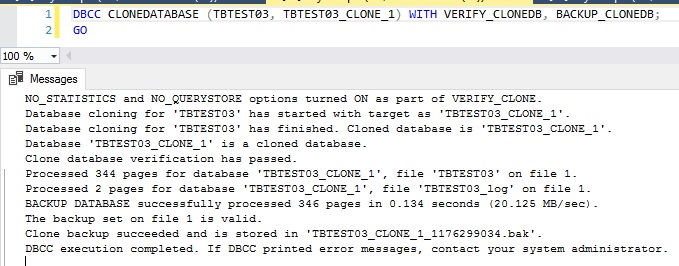
6.在複製指令中加入參數"VERIFY_CLONEDB"與"BACKUP_CLONEDB"
"BACKUP_CLONEDB"這個參數會在複製資料庫後進行備份,這個功能是在SQL Server 2016 SP2開始
command:
DBCC CLONEDATABASE (TBTEST03, TBTEST03_CLONE_1) WITH VERIFY_CLONEDB, BACKUP_CLONEDB;    
GO


errorlog內容,時間由近到遠:
CHECKDB for database 'TBTEST03_CLONE_1' finished without errors on 2019-01-19 09:40:35.853 (local time). This is an informational message only; no user action is required.

Database backed up. Database: TBTEST03_CLONE_1, creation date(time): 2019/01/19(09:40:34), pages dumped: 354, first LSN: 34:576:37, last LSN: 34:595:1, number of dump devices: 1, device information: (FILE=1, TYPE=DISK: {'E:\DBBackup\TBTEST03_CLONE_1_1176299034.bak'}). This is an informational message only. No user action is required.

CHECKDB for database 'TBTEST03_CLONE_1' finished without errors on 2019-01-19 09:40:35.853 (local time). This is an informational message only; no user action is required.

CHECKDB for database 'TBTEST03_CLONE_1' finished without errors on 2019-01-19 09:40:35.853 (local time). This is an informational message only; no user action is required.

DBCC CHECKDB (TBTEST03_CLONE_1) WITH no_infomsgs executed by sa found 0 errors and repaired 0 errors. Elapsed time: 0 hours 0 minutes 0 seconds.  Internal database snapshot has split point LSN = 00000022:00000233:0001 and first LSN = 00000022:00000231:0001.

DBCC CHECKDB (TBTEST03_CLONE_1) WITH no_infomsgs executed by sa found 0 errors and repaired 0 errors. Elapsed time: 0 hours 0 minutes 0 seconds.  Internal database snapshot has split point LSN = 00000022:00000233:0001 and first LSN = 00000022:00000231:0001.

Database 'TBTEST03_CLONE_1' is a cloned database. This database should be used for diagnostic purposes only and is not supported for use in a production environment.


結論:
這個功能方便使用,但是官方也提供以下警語。
這個是使用資料庫內部的快照功能來進行複製所以還是會產生LOCK。若要在生產環境使用,還是請再三評估。

DBCC CLONEDATABASE uses an internal database snapshot of the source database for the transactional consistency that is needed to perform the copy. Using this snapshot prevents blocking and concurrency problems when these commands are executed. If a snapshot can't be created, DBCC CLONEDATABASE will fail.
Database level locks are held during following steps of the copy process:
Validate the source database
Get S lock for the source database
Create snapshot of the source database
Create a clone database (an empty database inherited from the model database)
Get X lock for the clone database
Copy the metadata to the clone database
Release all DB locks

As soon as the command has finished running, the internal snapshot is dropped. TRUSTWORTHY and DB_CHAINING options are turned off on a cloned database.


2019年2月5日 星期二

SQL Server how to combine column data to string

env:Windows Server 2016
       SQL Server 2016 SP2

之前遇到一個需求,把欄位的資料合併為一個字串,每個資料需要用逗號分隔。
這次我們直接組出語法

1.利用FOR XML語法來組出結合字串的語法
command:
SELECT
(SELECT CAST([Name] AS NVARCHAR) + ',' FROM [dbo].[TETTB01] for xml path(''))
FROM [dbo].[TETTB01]

2.字串已經組合出來並且是以逗號做分隔,但是字串結尾也是逗號,這是接下來要處理的部分。移除字串結尾的逗號。
command:
SELECT 
LEFT((SELECT CAST([Name] AS NVARCHAR) + ',' FROM [dbo].[TETTB01] for xml path(''))
,LEN((SELECT CAST([Name] AS NVARCHAR) + ',' FROM [dbo].[TETTB01] for xml path('')))-1)
FROM [dbo].[TETTB01]


2019年2月3日 星期日

SQL Server find filename from directory column

env:Windows Server 2016
       SQL Server 2016 SP2

column裡面儲存的資料是檔案名稱與路徑,要怎麼順利把檔案名稱取出來?

1.建立存放測試資料的表
command:
CREATE TABLE #DirTree
(
subdirectory NVARCHAR(200),
depth INT,
isfile BIT
)

2.利用xp_dirtree放入資料到測試表
command:
INSERT INTO #DirTree (subdirectory, depth, isfile)
EXECUTE master.sys.xp_dirtree ' F:\DBBackup\dbserver03\Fullbackup\',1,1

3.再利用測試表的資料做出含有路徑檔名的完整測試資料
command:
SELECT 'F:\DBBackup\dbserver03\Fullbackup\' + subdirectory AS FullDirectory
INTO #DirTreeFull
FROM #DirTree

4.最後利用REVERSE與CHARINDEX這個function將檔名分離到一個獨立欄位
command:
SELECT *,
REVERSE(left(REVERSE(FullDirectory), CHARINDEX('\', REVERSE(FullDirectory)) - 1)) AS [FileName]
FROM #DirTreeFull


5.下面語法分離路徑與檔案
command:
SELECT *,
REVERSE(SUBSTRING(REVERSE(FullDirectory), CHARINDEX('\', REVERSE(FullDirectory)) + 1, LEN(FullDirectory))) AS [DirectoryName],
REVERSE(left(REVERSE(FullDirectory), CHARINDEX('\', REVERSE(FullDirectory)) - 1)) AS [FileName]
FROM #DirTreeFull